Free 30-day trial
A work of art
for your artwork.
Amberald is the modern alternative to Lightroom and Photoshop: a lightning-fast library, non-destructive RAW develop and a full image editor, in one app. Built for millions of photos, with AI that runs entirely on your machine. Version 1.0 is out now for Windows, macOS and Linux.
- One app: library, darkroom, montage
- 100% local, no cloud, no account
- Windows · macOS · Linux
Millions
of photos per catalog, the scale Amberald is designed for
Three rooms
library, darkroom, montage: one click between them
Seconds
until new photos appear, not hours
100 %
of the AI runs on your machine
01 Library
Your library understands what's in your photos.
Just type what you remember: “forest dog”, “red jacket on the beach”. The matches appear instantly, without you ever having tagged a thing, and without a photo leaving your machine.
- Natural-language AI search: local, no cloud, no account
- Built for millions of photos: workable seconds into an import, the UI never blocks
- People, recognized locally: name once, get suggestions everywhere
- The Lightroom move: ratings, collections, keywords, people and develop settings come along
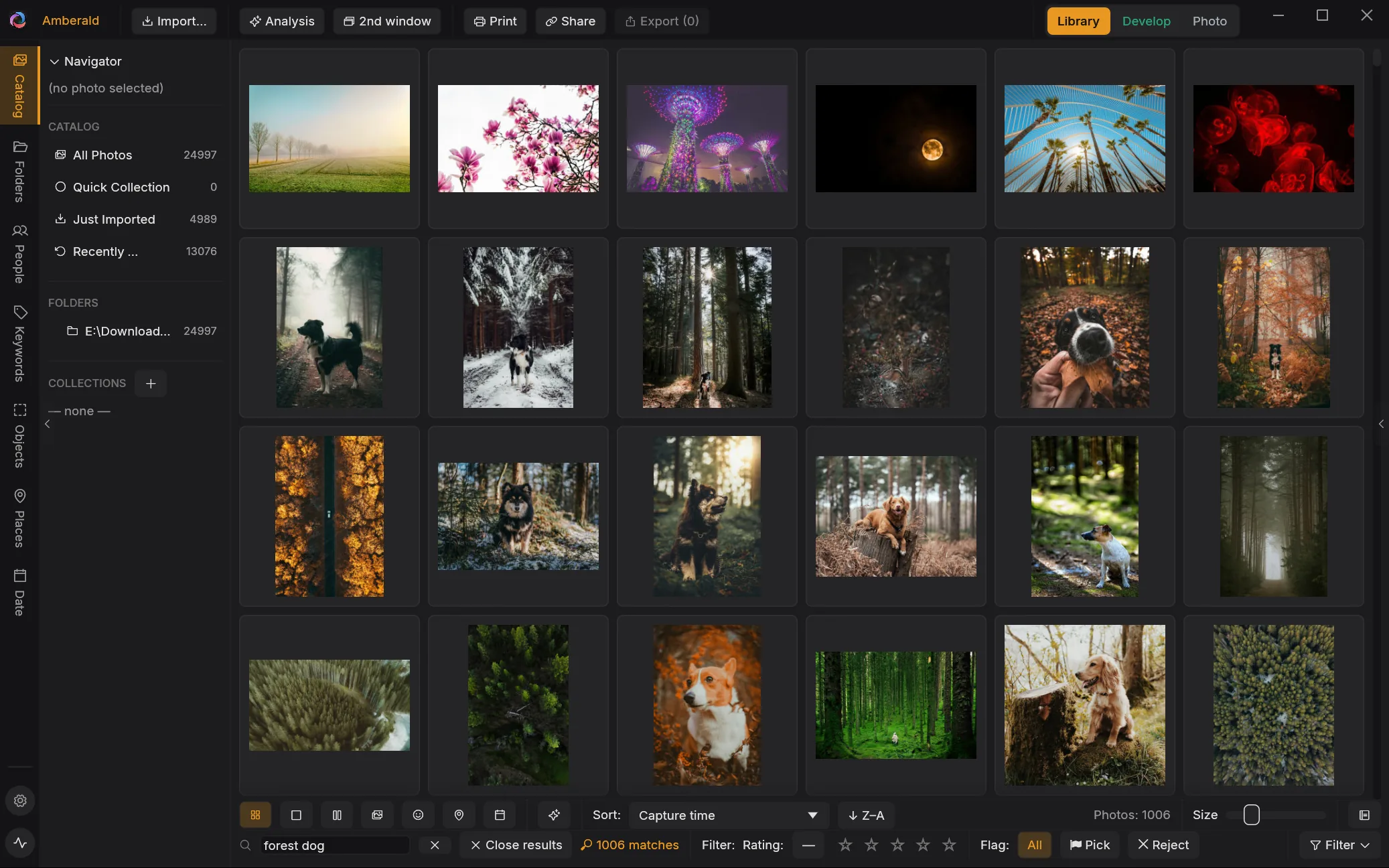
Amber → Emerald
When the photo is chosen, the real work begins.
Amberald's second room is a full RAW darkroom. The library wears amber, developing wears emerald. One app, three rooms, one click between them.
02 Develop
True layers. Not just global sliders.
Every adjustment lives on a layer with its own mask, painted, gradient, or from the AI: subject, sky, person, depth, light. Non-destructive, on your GPU.
- Layers, masks & blend modes: build edits like a compositor
- Versions branch like a tree: each with its own complete history
- AI tools, local: denoise, upscale, remove objects, replace skies
- Calibrated colors: RAWs open the way you know them
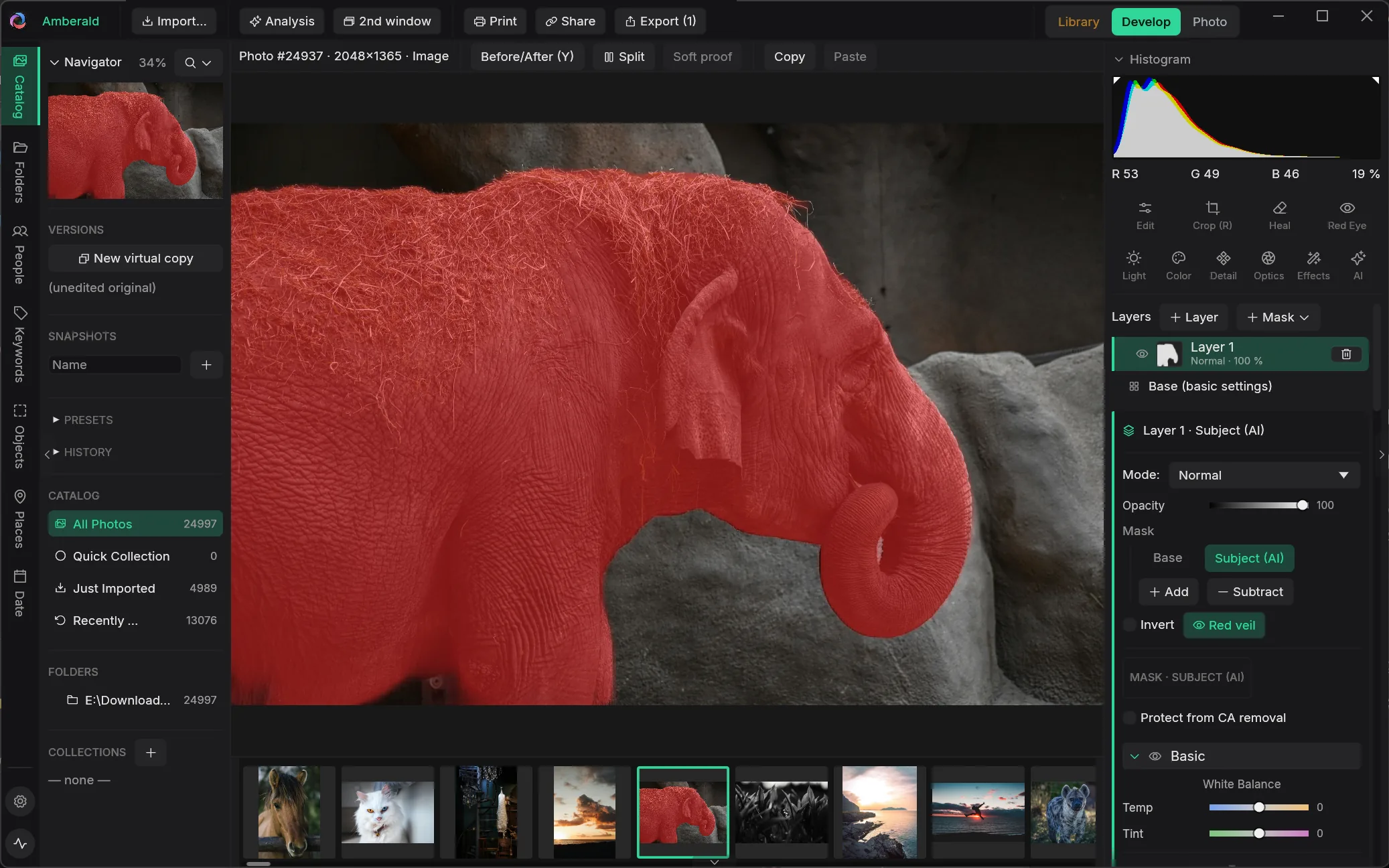
Emerald → Diamond
Where the darkroom ends, Photo begins.
The third module is a full image editor in the Photoshop mold: toolbar, options bar, dockable palettes, the familiar keyboard shortcuts. Montage wears diamond.
03 Photo
A full image editor. Built in.
Pixel layers, adjustment layers, masks, text and retouching down to frequency separation, with PSD in both directions. If you know Photoshop, you're instantly at home.
- No TIFF ping-pong: the layers sit on the living develop recipe, one photo stays one
- Tools you know: brush, heal, clone stamp, paths, text, shapes
- Retouching classics: frequency separation, liquify, warp, focus stacking
- Open & write PSD: layers, groups, masks and blend modes survive
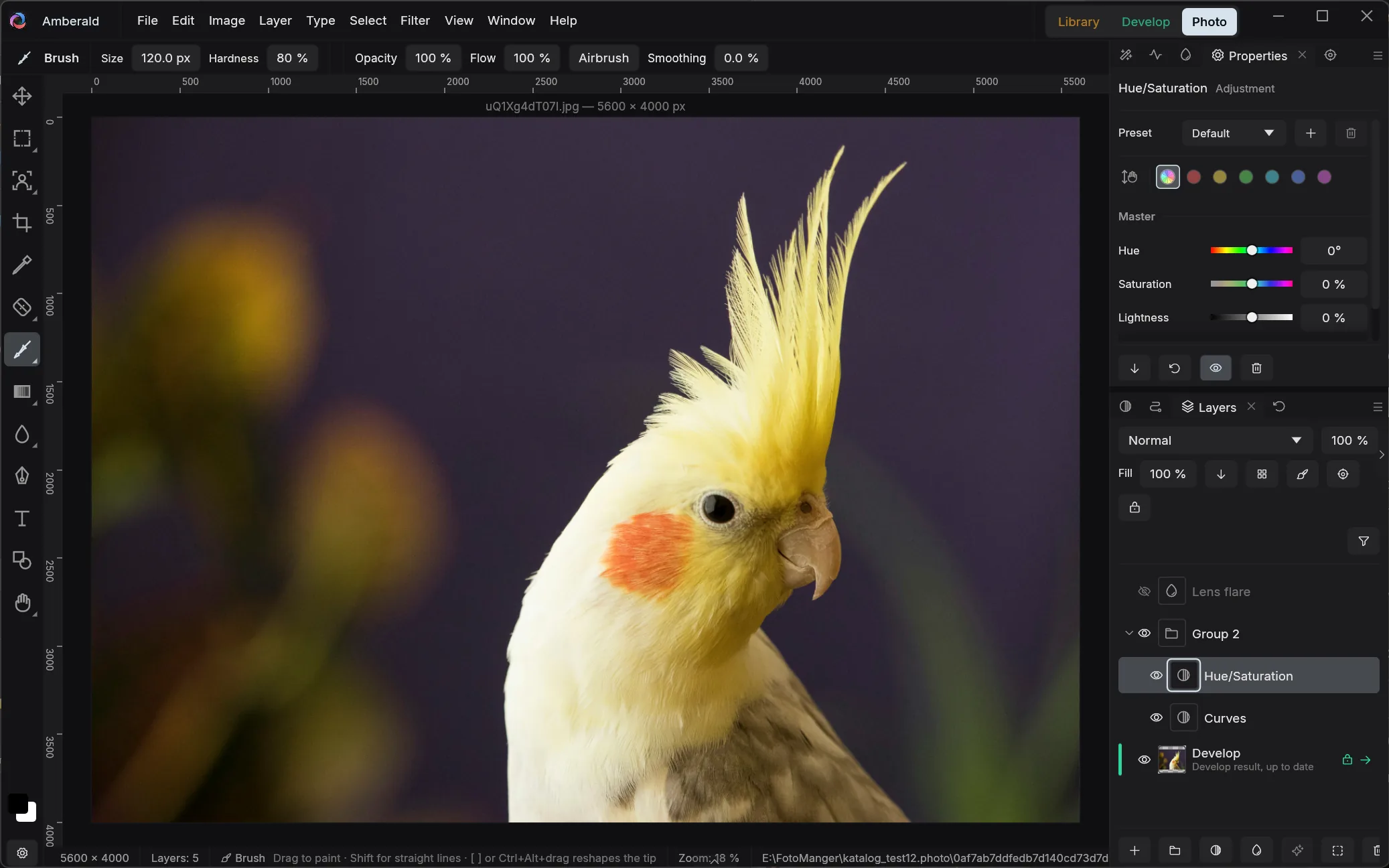
04 The comparison
One app, one purchase: Amberald vs. Lightroom + Photoshop
| Amberald | Lightroom Classic + Photoshop | |
|---|---|---|
| Pricing model | One-time purchase | Subscription only |
| Natural-language photo search, offline | Yes | No |
| True adjustment layers in the RAW workflow | Yes | In Lightroom: masks, no layers |
| Layer editing on top of the RAW, no intermediate file | Yes | Only via a TIFF/PSD copy |
| Version management | Version tree, own history per version | Virtual copies & snapshots |
| Browse folders without importing | Yes | In Lightroom: import required |
Adobe, Lightroom, Lightroom Classic and Photoshop are trademarks of Adobe Inc. Comparison refers to Lightroom Classic and Photoshop as of July 2026; features and pricing may change.
05 Platforms
One catalog. One license. Three platforms.
Amberald is a true native app, not a browser in a window costume. The same catalog opens on all three systems.
macOS
Apple SiliconLinux
.deb · .rpm · x6406 Where things stand
Not a rendering. A running program.
Every screenshot on this page comes out of the real application, running against a real catalog.
Library, develop, Photo
Import including Lightroom and digiKam migration, grid and loupe, people, AI search, the complete develop module, export down to DNG, client proofing, and the Photo module for retouching and compositing, with PSD.
Color and polish
Color response is calibrated slider by slider against real Lightroom exports, and measured. Alongside that: accessibility and keyboard control.
The iPad and a signed Windows installer
An iPad companion for culling on the move comes next. Alongside it: a signed Windows installer, so the SmartScreen warning goes away, and the manual.
07 Pricing
Pay once. Use forever. No subscription.
Try it free for 30 days with every feature. If it fits, buy it once: one license for Windows, macOS and Linux, personal and commercial alike, and all three rooms are included.
Founders price
€149 once
Final price including VAT, three devices, no subscription. Outside the euro area you pay in your local currency; the exact amount is shown at checkout.
Founders price until 28 February 2027: every update of versions 1 and 2 is included. After that the price goes up, and the regular licence includes the version 1 updates.
Payment is handled by Paddle as merchant of record. No connection to Paddle is made before you click buy. See privacy and refunds.
08 Questions
Straight answers to the usual questions.
Yes.
Can I try Amberald first?
For 30 days, with every feature. No account and no payment details; the trial is started online once. The catalog and the edits from your trial carry over when you buy.
No.
Is Amberald a subscription?
Amberald is a one-time purchase with no monthly fee. One license covers Windows, macOS and Linux, for personal and commercial use, on up to three devices.
Two versions.
What is the Founders price?
The introductory price at launch. A Founders licence includes every update of versions 1 and 2; the regular licence after that includes the version 1 updates. How long the Founders price applies is stated next to the price; both are set out in the licence agreement, section 8.
Almost.
Does Amberald replace Photoshop too?
Amberald Photo is a full image editor: pixel and adjustment layers, masks, blend modes, text, shapes, paths, retouching down to frequency separation and liquify, and PSD in both directions. Built for photo workflows; whether your special cases are covered is what the free 30-day trial will show you.
No.
Do the AI features need the cloud or an account?
Natural-language search, auto-tagging, object detection, face recognition and all AI editing tools run locally on your own machine. No internet connection and no account are required.
Yes.
Can I migrate my Lightroom catalog?
Amberald imports Lightroom Classic catalogs directly: ratings, flags, color labels, collections including smart collections, keywords, people with face regions, develop settings and virtual copies. The import can be interrupted and resumed.
Two.
Which platforms does Amberald run on?
Windows, macOS and Linux, natively, with one catalog format and the same application on all three. A real desktop app, not a web app in a window costume.
Yes.
Will my photos stay on my own machine?
Photos, catalog and AI models live on your disk. There's no account, no upload and no cloud dependency, and the AI features work offline.
From the shutter to the finished picture.
Pay once. Everything local. Library, develop and montage in one app. For Windows, macOS and Linux.